This is an Alfred v1 extension Updates are in progress, but not all are done yet.
Download
Simple timer. Start time, stop, reset, and show elapsed time (either while running, or after stopped).
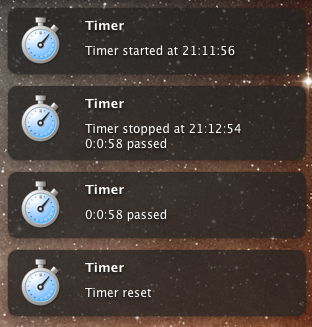
Usage
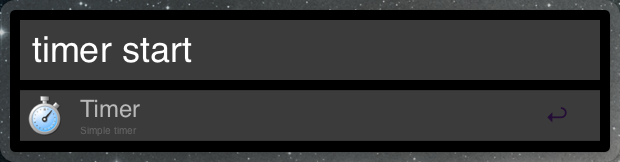
> timer start
alias: s
> timer stop
alias: x
> timer reset
alias: r
> timer time
alias: t (or any unreserved string)
Notes
Starting the timer while it’s running will restart the timer.
Configuration
Find the extension in Alfred Preferences and change the timezone string (default “America/Los_Angeles”) to your local timezone. You can find acceptable timezones here: http://www.php.net/manual/en/timezones.php
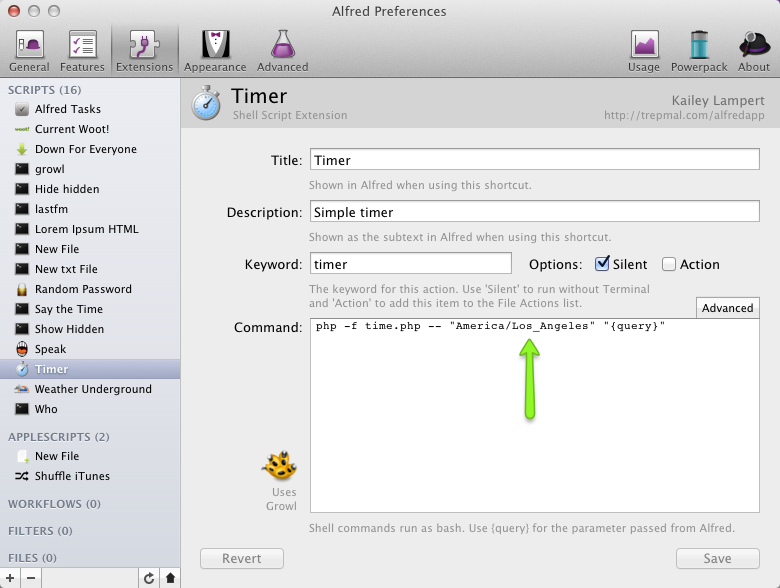
If unchanged, your elapsed time will still be correct, but start and stop times may be offset.
You can download Alfred App for free here: http://www.alfredapp.com/.
To kick things up a notch with extensions and more, get the Powerpack for Alfred.
Could you build one that copies the current date to the clipboard? Or inserts it into the active window? I currently use Typinator for this only.
Thanks,
Braden
Shouldn't be too difficult to put together. If you don't see a post from me over the next day or so, feel free to nudge me here or on twitter.
This should help Copy Date & Time. Let me know what you think.
Thank you! Perfect!
Love the timer. One request would be to add an Egg Timer function. Set it for 10 minutes and Growl alerts when time is reached.
Thanks for the great extension!
That ability is actually part of the Alarm extenstion.