Download Random Password For Alfred v2 Only.
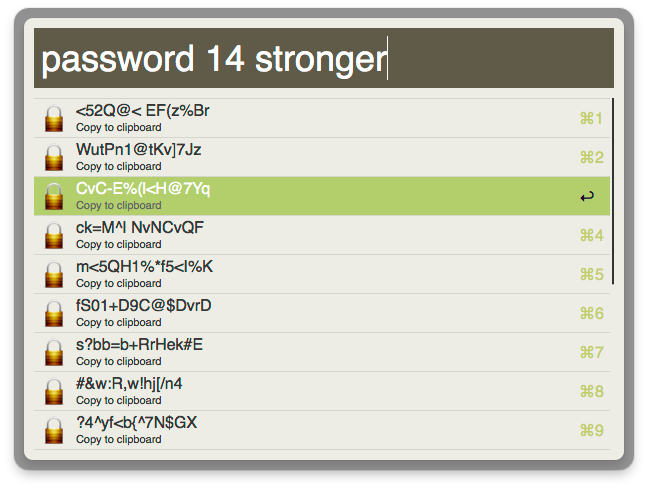
Usage
> password {length} {strength}
length: any number, defaults to 12, can be left out
strength: defaults to empty (alphanumic). strong will add special characters (!@#$%^&*()); ‘stronger will add more special characters (-_ []{}<>~`+=,.;:/?|)
The default action is to copy the selected password to your clipboard instantly. Since the passwords are generated ahead of time (unlike in v1) there’s virtually no delay between selecting one and copying it, so there’s no confirmation ding/notification.
Use alt+enter to immediately paste the password into the frontmost app.
If you prefer a *ding* use cmd+enter. Alternatively, you can just go into the preferences and switch things around. It’s easy, here’s how:
Not shown is that you can also change the modifier key (cmd/shift/alt/ctrl/fn) by double-clicking the rope.
If you’re looking for the Alfred v1 extensions, go to the next page. But please note these will no longer be maintained or updated, and will eventually be taken down.
You can download Alfred App for free here: http://www.alfredapp.com/.
To kick things up a notch with extensions and more, get the Powerpack for Alfred.
Any chance you’d like to add generating passwords from http://passphra.se/ to this? Very cool plugin 🙂
(over a year later) Working on it for Alfred v2!
Alfred 2?
In production. Will be posting updates soon!
Works beautifully. Thanks!
This is fantastic — thank you. One question: How can I edit the script to change the strength modifiers from strong and stronger to s and ss? I changed the keyword from password to pw, but that one is easy 🙂 I’m a photographer, not a coder, so I’m afraid I’m not confident enough to guess at what to change in the code.
I am not a coder! If any who knows better can correct me here, please do. But, in an effort to answer David LaSpina above and anyone else who may want to know how to change the Strong and Stronger shortcuts, here is what I did and what seems to be working.
View the workflow in Alfred. Double-click on the Script Filter. Scroll down about 2/3 of the way until you see:
if ( in_array( ‘stronger’, $q ) ) {
And a similar line about six lines down referencing the ‘strong’ keyword. Simply change stronger and strong to what you would like to type instead. For instance, ‘ss’ and ‘s’. Don’t remove the single quote marks, though!
I figured this out through a little trial and error and it seems to be working for me. Again, if I am making a error, someone please let me know. Otherwise, I hope this helps someone.